


Prioritize a working mobile checkout, reliable payments, accurate tracking and discoverable product pages before adding advanced features. This guide is an implementation checklist for store owners: fix purchase blockers first, then improve performance and measure the outcome.
One of the biggest benefits of professional eCommerce website design is that it blends aesthetics with functionality, building trust while driving conversions. This guide explores the best practices for eCommerce website development that help stores scale and thrive.
What Makes eCommerce Website Development Unique?

An ecommerce site must support browsing, stock information, orders and payments. Define who owns each integration and how failures will be detected. A visually attractive page is only one part of a reliable store.
- Constant traffic across multiple devices.
- Secure transactions with payment gateways.
- Customer information, including credit card numbers and addresses.
- Scalable infrastructure to handle sales events like Black Friday.
- Conversion-focused experiences that drive revenue.
Core Elements of Development for eCommerce
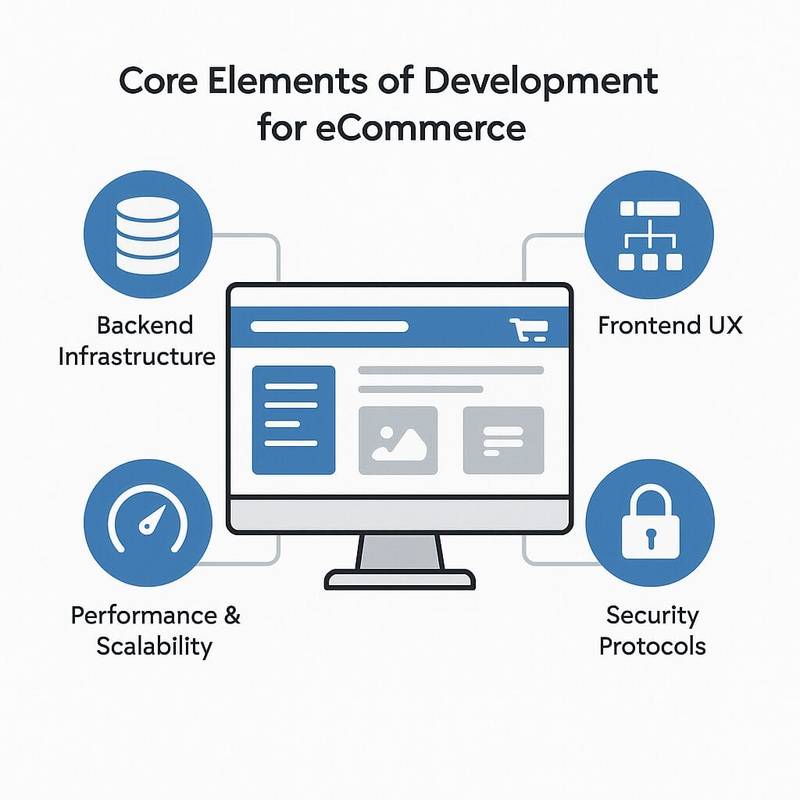
- Backend Infrastructure: Servers, databases, payment processing.
- Frontend UX: Menus, product listings, and checkout flows.
- Performance & Scalability: Load times and uptime during traffic spikes.
- Security Protocols: Encryption, firewalls, and fraud detection.
- Marketing & Analytics: SEO, social media, and conversion tracking.
Best Practices for eCommerce Website Development

Let’s break down the 18 pillars of modern eCommerce website development.
1. Mobile-First Development
Test your mobile product and checkout pages on real devices. Check variant selection, shipping charges and payment errors with your own catalog.
Best Practices
- Responsive Design: Frameworks like Bootstrap or Tailwind CSS.
- Touch-Friendly Buttons: Sized for fingers, not cursors.
- Simplified Checkout: Mobile wallets like Apple Pay.
- Sticky CTAs: Keep “Add to Cart” visible while scrolling.
- PWAs: Progressive Web Apps for app-like shopping without downloads.
2. Website Speed & Performance
Measure loading, responsiveness and layout stability using Google’s Core Web Vitals guidance. Prioritize the pages and devices where shoppers encounter delays.
Best Practices
- Compress Images: Use WebP or AVIF.
- Lazy Loading: Load visuals only when needed.
- CDNs: Content Delivery Networks for faster delivery worldwide.
- Minify Code: Streamline CSS and JavaScript for Faster Loading.
- Optimize Core Web Vitals: Pay attention to Cumulative Layout Shift (CLS), Interaction to Next Paint (INP), and Largest Contentful Paint (LCP).
3. Strong Website Security
Shoppers won’t trust a site that feels unsafe. Data breaches are costly in dollars and reputation.
Best Practices
- SSL Certificates: Always use HTTPS.
- PCI DSS Compliance: Secure handling of payment data.
- Multi-Factor Authentication: For admin accounts.
- Fraud Detection Tools: Signifyd, Sift.
- GDPR/CCPA Compliance: Respect customer privacy laws.
4. Simplified Checkout Experience
Checkout abandonment has several causes, including browsing without immediate intent to buy. Use Baymard’s checkout research to identify possible friction, then test shipping transparency, guest checkout and error handling on your own store.
Best Practices
- Guest Checkout: Don’t force sign-ups.
- Progress Bars: Show checkout steps.
- One-Page Checkout: Minimize clicks.
- Payment Options: Cards, PayPal, BNPL.
- Trust Signals: Badges and refund guarantees.
5. SEO-Friendly Development
Best Practices :-
AI Overview
- Optimize for semantic search so AI-driven algorithms (RankBrain, BERT, Gemini) can understand intent.
- Add conversational keywords to capture voice search queries.
- Use AI-powered tools (Surfer SEO, Clearscope) to improve topical coverage and content relevance.
- Monitor content with AI plagiarism and duplication checkers to avoid penalties.
Structured Data: Rich snippets with Schema.org
- Implement Product, Review, and FAQ schema to increase click-through rates.
- Add Breadcrumb schema for better navigation in SERPs.
Canonical Tags: Avoid duplicate content
- Apply canonicals to similar product variations (e.g., color/size).
- Choose a genuinely equivalent canonical page; do not point every product variant at a category indiscriminately.
XML Sitemaps: Keep them updated
- Generate dynamic XML sitemaps that auto-update when products are added or removed.
- Split large stores into multiple sitemaps (products, categories, blog).
- Submit to Google Search Console regularly.
Unique Descriptions: Don’t copy manufacturer text
- Write human-first, keyword-rich product copy.
- Include long-tail keywords and synonyms AI tools identify.
- Add buyer-focused benefits instead of just features.
6. Personalization & UX Optimization
Shoppers want relevant, personalized experiences. Even small UX adjustments highlight how web design affects eCommerce conversion rates, from the placement of call-to-action buttons to simplified navigation structures.
Best Practices
- Dynamic Recommendations: Based on browsing history.
- AI-Powered Search: Autocomplete with NLP.
- Behavioral Popups: Discounts triggered by user intent.
- Sticky Search Bars: Easy navigation.
- Live Chat Bots: 24/7 support powered by AI.
7. Scalability & Future-Proofing
Choose infrastructure for the catalog and traffic you expect, with room for realistic growth. Many stores can scale using conventional architecture. Add headless systems or microservices only when a specific requirement justifies their cost and maintenance.
Best Practices
- Cloud Hosting: AWS, Google Cloud, Azure.
- Microservices Architecture: Modular and flexible.
- API-First Development: Easier integrations.
- Headless Commerce: Decouple frontend/backend for omnichannel.
- Load Balancers: Handle peak traffic smoothly.
8. Analytics & Conversion Tracking
Without analytics, you’re blind. Data fuels optimization.
Best Practices
- GA4 ecommerce events: Track add-to-cart, checkouts, and purchases.
- Heatmaps (Hotjar): Visualize user behavior.
- A/B Testing: Headlines, CTAs, product images.
- Attribution Models: Identify profitable channels.
- Cohort Analysis: Improve repeat customer retention.
9. Social Media & Marketing Integrations
Connect only the marketing channels you use and test the resulting product feeds, purchase events and order data. Review integration behavior after platform updates.
Best Practices
- Shoppable Posts: Instagram, TikTok, Facebook.
- Social Logins: Google, Facebook, Apple.
- Email Sync: Klaviyo or Mailchimp.
- Review Widgets: Yotpo, Trustpilot.
- WhatsApp Business API: Direct messaging with customers.
10. Product Page Optimization
Your product page is your digital salesperson.
Best Practices
- 360° Product Views & Videos.
- Detailed Descriptions with Bullet Points.
- Authentic reviews and accurate stock information.
- Cross-Sell/Upsell Recommendations.
- Clear, Contrasting CTAs.
11. Site Navigation & Search Optimization
Shoppers leave if they can’t find products fast.
Best Practices
- Mega Menus & Faceted Filters.
- Predictive Search with Autocomplete.
- Breadcrumbs for Backtracking.
- Voice Search on Mobile.
12. Payment Gateway & Multi-Currency Options
Shoppers want payment flexibility.
Best Practices
- Support global wallets + BNPL (Klarna, Afterpay).
- Offer multi-currency checkout.
- Use fraud detection systems.
- Offer regional payment options (iDEAL in the Netherlands, UPI in India).
13. Customer Support & Live Chat Integration
Support can make or break retention.
Best Practices
- AI Chatbots for 24/7 support.
- Live chat during business hours.
- Help desk integration (Zendesk).
- Order Tracking Portal.
14. Accessibility & Inclusive Design
Over 1 billion people worldwide live with disabilities.
Best Practices
- WCAG Compliance: Contrast, captions, alt text.
- Keyboard-Friendly Navigation.
- Scalable Fonts & Adjustable Layouts.
- ARIA Labels for Screen Readers.
15. Content Marketing Integration
Content isn’t optional. It’s a growth driver.
Best Practices
- Blogs for SEO (guides, how-tos, comparisons).
- Video Tutorials & Product Demos.
- UGC (customer photos, reviews).
- Content Hubs for resources.
16. Loyalty Programs & Customer Retention
Finding new customers is more expensive than keeping existing ones.
Best Practices
- Points & Rewards Systems.
- Tiered Loyalty Levels.
- Referral Programs.
- Birthday & Personalized Coupons.
17. Internationalization & Multi-Language Support
Don’t limit your market.
Best Practices
- Multi-language sites with hreflang tags.
- Multi-currency checkout.
- Localized shipping options.
- Localized SEO strategies.
18. Continuous Testing & Iteration
A website is never “done.”
Best Practices
- A/B Testing for pages.
- User Testing with real shoppers.
- Error Monitoring (Sentry).
- Agile Iterations: Frequent, small improvements.
Illustrative measurement plan, not a client result: record mobile checkout completion, payment errors and contribution per order before a release. Compare them after the change using comparable traffic, and document promotions or stock changes that could affect the result.
- Record a baseline before implementation.
- Track checkout completion with comparable traffic.
Revenue up 40%.
Frequently asked questions
What’s the most important eCommerce development practice?
How can I reduce cart abandonment?
Which eCommerce platform is best?
How do I secure my store?
Should SEO be built into development?
How do I make my store accessible?
Conclusion
By following these 18 best practices for eCommerce website development, you’ll build a store that’s not only visually appealing but also fast, secure, scalable, accessible, and conversion-driven.
Agree on acceptance criteria with your developer: successful test orders, maintainable integrations, accessible forms and accurate reporting. No development checklist can guarantee business growth.
At Nexus Digital Hub, we specialize in digital marketing services for eCommerce stores, helping brands build scalable, high-converting websites.
Ready to transform your store? Check out our SEO, social media marketing, and website design services now.
A practical release checklist
| Priority | Acceptance check |
|---|---|
| Before launch | Complete successful and failed test payments; verify stock, shipping, tax settings and confirmation messages. |
| Before launch | Test mobile checkout, keyboard navigation and form errors. |
| Before launch | Check canonical URLs, redirects, crawlable navigation and intended indexability. |
| After release | Compare orders with analytics events; inspect errors and key customer journeys. |
| Next improvements | Prioritize observed friction by business impact and implementation effort. |
For platform selection, use our ecommerce platform guide. For content, connect your product keyword map to useful product descriptions. Define navigation using Google’s ecommerce site-structure guidance.
Planning a build or redesign? Explore our store-design service with your platform, catalog size and current checkout problems. A working checkout deserves priority over another homepage animation.


Pingback: Best eCommerce Platform: Costs and Selection Checklist
Pingback: Benefits of Professional eCommerce Website Design